
Start with the golden rule
Digital etiquette begins with a simple but often overlooked reality: there is a human being on the other side of the screen. It is easy to forget this when communicating through text, emojis, or video calls, but the people receiving your messages have feelings, perspectives, and lives just like you do. Treating online interactions with the same respect you would offer in a face-to-face conversation is the foundation of all good digital behavior.
When you send a message, you are not just transmitting data; you are initiating a social exchange. A quick, dismissive reply in a group chat can feel like a slight, while a thoughtful response can build trust. This principle applies to every platform, from professional emails to casual social media comments. By pausing to consider how your words might land, you avoid unnecessary conflict and foster a more positive online environment.
Respectful digital communication also means acknowledging the time and attention of others. Avoid sending unnecessary notifications, keep messages concise, and refrain from using all caps or excessive punctuation that can come across as shouting. These small adjustments show that you value the other person’s experience, reinforcing the idea that online spaces are still human spaces.
Write clear and concise emails
Professional email etiquette relies on the "5 Cs": Complete, Correct, Concise, Courteous, and Clear. These principles ensure your message is understood without requiring follow-up clarification. Writing with clarity respects the recipient's time and maintains professional standards.
Provide all necessary context, attachments, and deadlines in the initial message. Avoid sending "follow-up" emails that contain missing details or links to incomplete information. A complete email allows the recipient to act immediately.
Proofread for spelling, grammar, and factual accuracy. Typos can undermine your credibility, while incorrect data can lead to costly mistakes. Verify names, dates, and figures before hitting send.
Keep your message focused and brief. Use short paragraphs and bullet points to highlight key information. Remove unnecessary filler words and get straight to the point to help the reader process the information quickly.
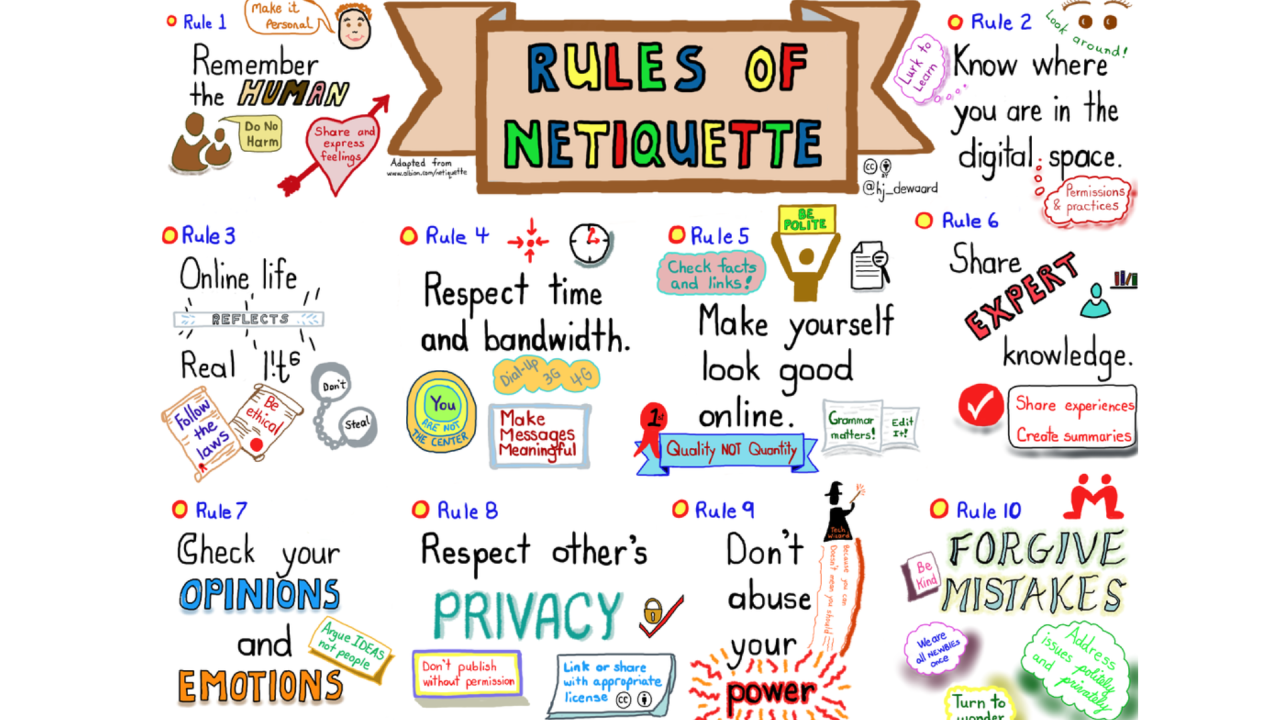
Use a polite tone and appropriate greetings. Remember that you are communicating with a real person. Avoid aggressive language, excessive exclamation points, or all-caps, which can appear confrontational.

Use simple, direct language. Avoid jargon or complex sentences that might confuse the reader. Ensure your subject line accurately reflects the email's content so the recipient knows exactly what to expect.
Respect privacy and boundaries
Digital etiquette begins with recognizing that every screen represents a real person with their own time, attention, and private life. Just as you would not shout in a library or barge into a closed office, online interactions require restraint and awareness of invisible boundaries. Treating digital spaces with the same courtesy as physical ones prevents misunderstandings and builds trust in your relationships.
Handle sensitive information carefully
Sharing private details without consent is a primary breach of digital etiquette. Before forwarding a message, tagging someone in a photo, or discussing a mutual contact’s situation, ask yourself if they would want that information public. If the answer is uncertain, keep it private. This applies to work chats, family group texts, and social media comments alike.
- Never share screenshots of private conversations without explicit permission.
- Avoid tagging people in posts that involve sensitive topics or personal moments.
- Verify facts before sharing news or rumors; spreading misinformation violates the trust of your network.
Think of your digital footprint like a public bulletin board. Anything you pin there is visible to everyone in the room, including those you didn’t intend to reach. Protecting others’ privacy means assuming that what is shared with you stays with you, unless they explicitly invite you to spread the word.
Respect reply times and availability
One of the most common sources of online friction is the expectation of immediate response. Unlike a phone call or an in-person conversation, digital messages are asynchronous. People have jobs, families, and offline lives that take precedence over their screens. Sending a message does not create an obligation for the recipient to drop everything and reply instantly.
To maintain respectful boundaries:
- Use “no rush” language when sending non-urgent messages to relieve pressure on the recipient.
- Avoid double-texting if you haven’t received a reply; wait at least 24 hours for non-urgent matters.
- Respect “Do Not Disturb” modes and quiet hours. If someone has set status indicators to avoid interruptions, honor them.
This doesn’t mean you should ignore messages indefinitely. Prompt replies are still a sign of respect, but “prompt” is contextual. A reply within a day is often sufficient for casual interactions, while urgent matters should be communicated through direct calls or clearly marked urgent channels.
Establish and honor digital boundaries
Healthy digital relationships require clear boundaries. This includes knowing when to mute notifications, when to step away from a heated thread, and when to decline participation in group chats that no longer serve you. You have the right to curate your digital environment, and others have the right to do the same.
If someone sets a boundary—such as asking not to be contacted on weekends or requesting that a topic not be discussed online—respect it without question. Pushing back against these limits signals disrespect and can damage the relationship. Conversely, if you need space, communicate it clearly. A simple “I’m offline this weekend” is far more effective than silent ghosting, which often causes unnecessary anxiety.
Ultimately, respectful online communication is about empathy. It requires pausing to consider how your words, timing, and sharing habits impact others. By prioritizing privacy, respecting time, and honoring boundaries, you create a digital environment that is safe, considerate, and sustainable for everyone involved.
Use video calls professionally
Video calls replace the physical office, so your camera presence sets the tone for the entire meeting. Treating a video conference like a casual chat often leads to misunderstandings, especially when body language is limited. Professional etiquette on video requires intentionality in how you look, sound, and interact.
Start with the environment. A plain, tidy background reduces visual distraction and keeps focus on the conversation. If you cannot control your surroundings, use a neutral blur or a simple professional backdrop. Lighting matters just as much; position a light source in front of you rather than behind. Facing a window or using a ring light prevents your face from appearing as a dark silhouette against a bright screen.
Audio discipline is the most common point of failure. Keep your microphone muted when you are not speaking to eliminate background noise like typing, pets, or household activity. When it is your turn to speak, unmute promptly and speak clearly into the device. Avoid talking over others; use the "raise hand" feature or wait for a natural pause to contribute. This small habit signals respect for everyone’s time and attention.
Finally, manage your visual engagement. Look at the camera lens when speaking, not at the faces on your screen. This simple adjustment creates eye contact with your remote colleagues, making the interaction feel more personal and direct. Keep your camera on unless technical issues force you to go dark. Being visible builds trust and accountability in a digital-first workplace.
-
Test lighting and audio before joining
-
Choose a tidy, neutral background
-
Keep microphone muted when not speaking
-
Look at the camera lens during key points
-
Use "raise hand" to interrupt politely
Common digital etiquette mistakes
Even with the best intentions, small oversights can derail digital conversations. Treating online spaces as distinct from face-to-face interactions often leads to friction. The "golden rule" of digital etiquette remains the same: you are communicating with a real person who will react to your message.
One frequent error is the overuse of capitalization. Writing in all caps is universally interpreted as shouting. It signals aggression or urgency, even when the sender intends only emphasis. A simple shift to standard sentence case restores a calm, professional tone.
Delayed responses also create invisible tension. While immediate replies aren't always possible, leaving messages unread for days without context can feel dismissive. A quick acknowledgment, such as "I received this and will review it by Friday," manages expectations and shows respect for the other person's time.
Inappropriate tone is perhaps the most common pitake. Without facial expressions or voice inflection, text is easily misread. Sarcasm often falls flat, and brief messages can seem curt. When in doubt, err on the side of politeness and clarity. Adding a greeting or a closing remark can soften the delivery and prevent unnecessary misunderstandings.
No comments yet. Be the first to share your thoughts!